Developers
You fix the case they complained about, and break another.
Getting the model to answer was the easy part. Now you’re deep in tool calls and sub-agents, the reasoning drifts in ways you can’t reproduce, and the only signal you get is somebody saying it did something strange in one case last week. What helps is a written-down definition of good, and every change scored against it.
import Workbench from "@zerowidth/workbench-sdk"// The flow your team designed and tested in Workbench,// exported as a file — running inside your own process.const engine = await Workbench.create(flow, { keys: { openrouter: process.env.OPENROUTER_API_KEY },})const { outputs } = await engine.run({ question: "Which of these tickets is urgent?",})- 01
npm i @zerowidth/workbench-sdkor skip it — the API is plain HTTP - 02
export ZEROWIDTH_API_KEY=zw_live_…workspace settings → API keys - 03
curl -X POST "$ZW/1.0/flows/$FLOW/runs" -d '{"input":{…}}'a flow your team already designed
The model is rarely the hard part. Getting everyone around it to agree is.
Anyone can call a model. Shipping an AI feature people trust means working out what it should do with the people who know the work, and keeping it right as they, your users and the models change.
What "good" looks like isn't written down
Success lives in the heads of the people who know the work. Until it becomes examples and a rubric, everyone is guessing, the model included.
The experience decides more than the prompt
How someone asks, reads and corrects an answer shapes what the model has to do, so designers belong in it from the start.
The knowledge is scattered
The answers live in documents, tickets and people's memories. An AI can only be as good as what it can reach.
A wrong answer doesn't say which step produced it
Once there are tool calls and sub-agents in the path, the reasoning can go astray anywhere along it. Without a record of what each step received and returned, changing the right one is guesswork.
The real feedback arrives after launch
Real users find the cases nobody listed. Without a way to catch what they say, it stays in a chat thread.
The models keep changing
A better model arrives every few months. Without evals you can't tell whether switching helps or quietly breaks something.
the loop
So we built the tools around those problems, and the code comes last
You write code in one of these four steps. The other three are how your team decides what it should do, and finds out whether it worked.
- 01Workbench
Design it with the people who know the work
Designers, subject experts and stakeholders shape the flow with you on a canvas, answering from your own documents, and try it the way users will. Their feedback lands on the flow itself and becomes tests, instead of a spec you translate into prompts.
How Workbench works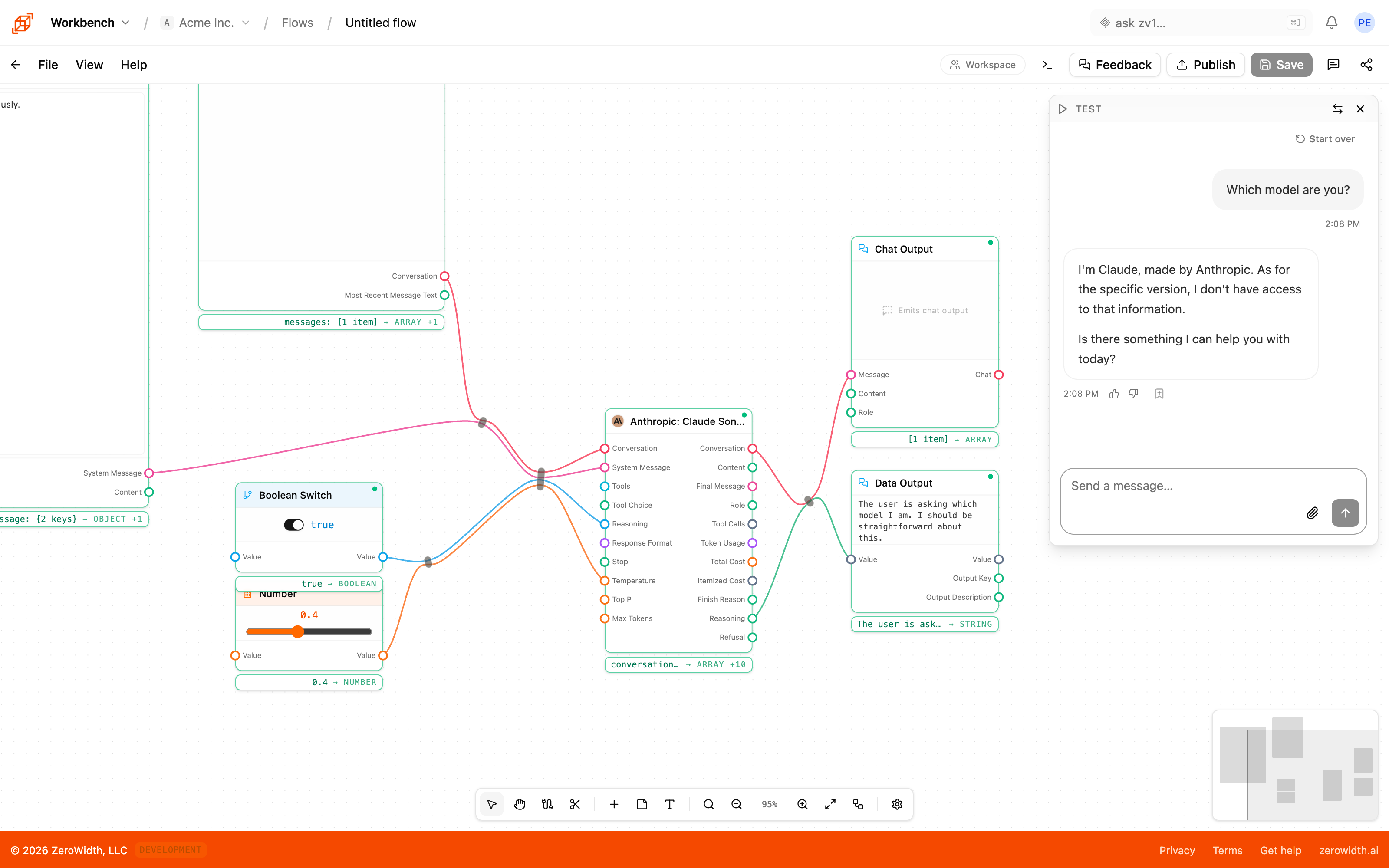
- 02Caliper
Agree on what good looks like, then check it on every pull request
The experts' examples and rubric become a dataset in Caliper, so everyone is working from the same written-down definition of good. Caliper scores every pull request and every new model you try against it, and the build fails when the score drops.
Evals in CI.github/workflows/eval.yml- name: Score the bot env: ZEROWIDTH_API_KEY: ${{ secrets.ZEROWIDTH_API_KEY }} ZEROWIDTH_EVAL_ID: ${{ secrets.ZEROWIDTH_EVAL_ID }} run: node eval.mjs --threshold 0.8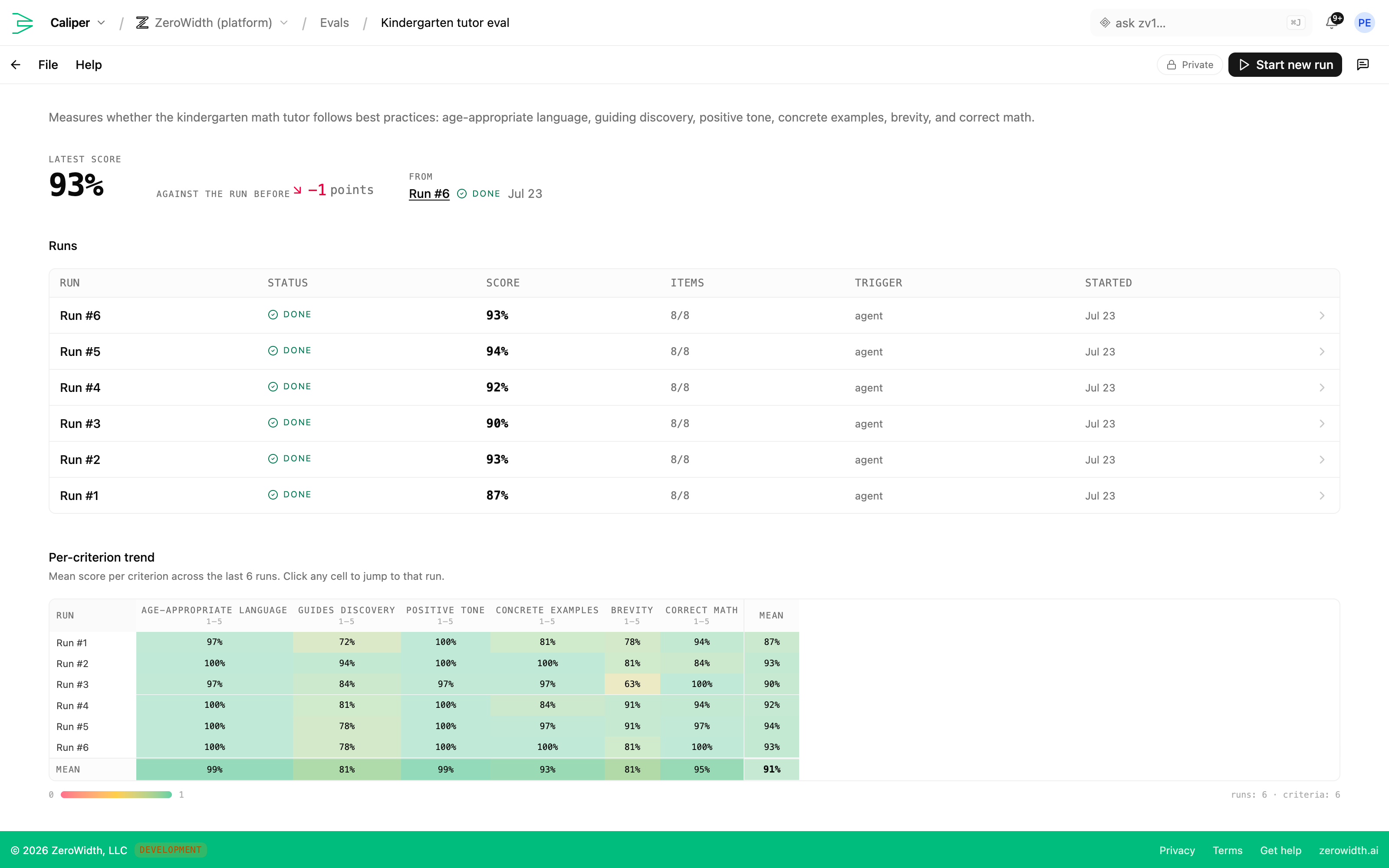
- 03Workbench
Ship it from your code
Call the flow over the API with a workspace key, and pin the exact version you tested. Or export it and run it inside your own process with the SDK, on the same engine.
The run APIrun.mjsconst res = await fetch( `https://api.zerowidth.ai/1.0/flows/${process.env.FLOW_UUID}/runs`, { method: "POST", headers: { Authorization: `Bearer ${process.env.ZEROWIDTH_API_KEY}`, "Content-Type": "application/json", }, body: JSON.stringify({ input: { kind: "chat", messages: [{ role: "user", content: "Hello" }] }, source: { kind: "published", version: "1.0.0" }, }), },)const { outputs } = await res.json() - 04Ledger
Measure what it changed, and keep learning
Send Ledger the numbers the change was meant to move, and it settles each expectation against them. The cases real users hit go back into the flow and its tests, so the next version starts from what you learned.
Ledger metricsmetrics.tsimport { createLedgerClient } from "@zerowidth/ledger-sdk"const ledger = createLedgerClient({ apiKey: process.env.ZEROWIDTH_API_KEY,})ledger.event("ticket_auto_resolved") // one happenedledger.measure("triage_time_minutes", 4.2) // a level you observed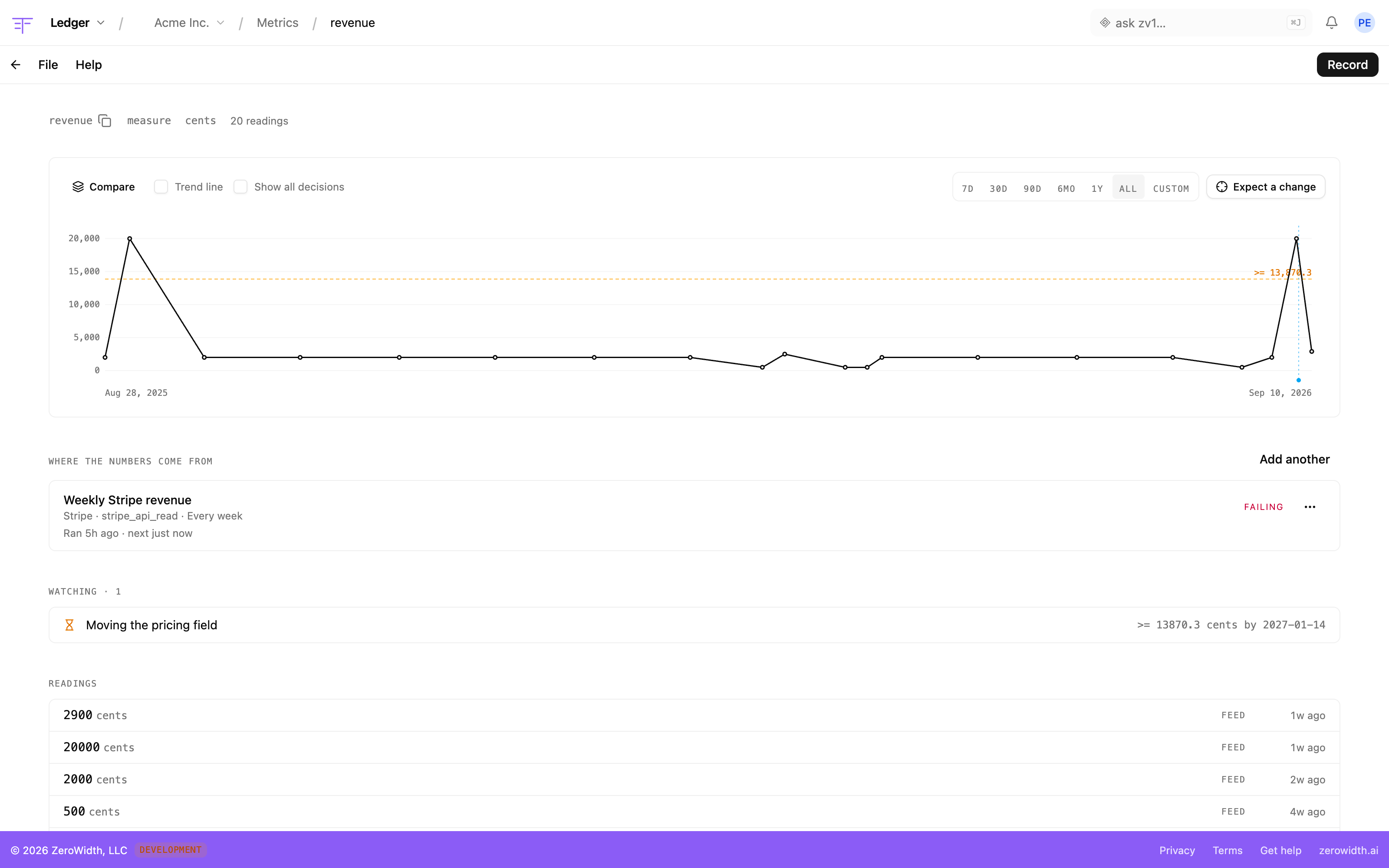
Use the parts you need. Keep the stack you have.
You don't have to adopt the whole loop. If you love your framework, your SDK or the system IT already approved, keep it, and bring in only the pieces that help.
Inference stays where it has to
Workbench calls the model providers you choose, or, on Enterprise, your own OpenAI- or Azure-compatible endpoint, like a model you host yourself. The SDK runs whole flows inside your own systems.
Map your systems, then build on them
Compass maps how your work and systems fit together, and binds each system on the map to a live MCP connection. The map is the picture of how things run and the kit of connections you build with.
Keep your framework, and prove it works
Whatever your AI runs on, Caliper can score it, so you can show it's working before and after it ships, at scale.
Your terminal and your coding agent reach the same workspace your team works in
From your terminal
Install it once and the CLI lists and runs flows, searches the docs and calls any tool your token allows. It answers to zerowidth or the short 0w.
Everything the CLI doesterminalnpm install -g @zerowidth/clizerowidth loginzerowidth flow ls0w flow run flw_2nQs0w flow run --local ./triage.zwfFrom your coding agent
ZeroWidth speaks MCP. Give the address to Claude Code, Cursor, Codex or whatever else you code in, and it can search these docs straight away. Add a personal token and the same agent works in your workspace, with your permissions and only the scopes you gave it.
Setting up MCPmcp serverstreamable http- endpoint
- https://api.zerowidth.ai/mcp
- auth
- Authorization: Bearer <personal token>optional — the docs tools answer without one
How do I run a Workbench flow from my code?
no token — searches these docsList my flows in the acme workspace.
with a tokenRun the ticket-triage eval on the latest dataset.
with a token that can writeShow me the sketch from yesterday's session.
with a tokenDraft a first-cut flow for triaging inbound tickets.
with a token that can write
The work your team does in the tools, your code can do over HTTP
A key carries only the permissions you give it, one product at a time. The full reference, with request and response shapes, is in the docs.
| method | path | what it does |
|---|---|---|
| POST | /1.0/flows/:flowUuid/runs | Run a flow |
| GET | /1.0/tasks | List your tasks |
| POST | /1.0/tasks/:taskId/runs | Start a task run |
| POST | /1.0/knowledge-bases/:id/search | Search a knowledge base |
| POST | /1.0/caliper/evals/:id/runs | Submit an eval run |
| POST | /1.0/caliper/feedback | Send feedback into a dataset |
| POST | /1.0/ledger/metrics/:slug/readings | Record a metric reading |
| GET | /1.0/shims/:id/weights | Fetch a shim's published weights |
Open source
The pieces you build with are public, so you can read them, run them and change them.
Workbench SDK
@zerowidth/workbench-sdk
The flow engine behind Workbench, to run flows in your own Node.js process.
Apache-2.0 · GitHub →
Ledger SDK
@zerowidth/ledger-sdk
A small, dependency-free client for sending metrics to Ledger, batched and never throwing.
Apache-2.0 · GitHub →
CLI
@zerowidth/cli
Your workspace from the terminal: flows, docs, sessions and any tool on the MCP server.
Apache-2.0 · GitHub →
Examples
Small, standalone projects to copy from, each with its own dependencies and README.
MIT · GitHub →
Start from something that already runs
All examples on GitHub →Your first flow can be running from your code in a few minutes.
Start free, and create an API key in your workspace settings.